
7524 South
Tanglewild Drive
Raleigh, NC
27613
(919)
787-1836
www.hugginsweb.com
sales@hugginsweb.com
Cross Reference System (XREF) Cost:
$495.00
OEM Companies
included:
1.
ACM
Arctic Cat
2.
BRP
SeaDoo PWC
3.
CRU
Crusader Engine Parts
4.
HON
Honda Marine
5.
IND
Indmar
6.
KAW
Kawasaki
7.
KOH
Kohler Generators
8.
MER
Mercury & MerCruiser
9.
OMC
Evinrude/Johnson/OMC
10.ONA Onan Generators &
Engines
11.PCM Pleasurecraft
Marine
12.POL Polaris
13.SUZ Suzuki
14.TOH
Nissan/Tohatsu
15.VOL Volvo
16.WES Westerbeke
17.YAM Yamaha
18.YAN Yanmar
Aftermarket
included:
1.
AEP
Arrowhead Electrical Products
2.
AFT
Aftermarket Marine
3.
API API
Marine
4.
ARC
ARCO
5.
BAR Barr
Manifolds
6.
CDI
CDI
7.
CHA
Champion Spark Plugs
8.
CPI
Champion Parts
9.
GLM GLM
Products
10.GLO Globe RunDry
Impellers
11.GTI Gasket
Technology
12.JAB Jabsco
13.JOH Johnson Pump
14.MAL Mallory
Marine
15.MAR March Pumps
16.MAS Mastercraft
17.MES MES
18.MIC Michigan
Wheel
19.MOT MotorGuide
20.NAU NauticPro
21.NGK NGK Spark
Plugs
22.OBR Outboard
Recycle
23.OSC Osco
Manifolds
24.PCO Propco
25.PRO Pro Marine
26.RAP Rapair
27.RED RedLine
28.SBT Short Block
Technologies
29.SEA SeaWay
30.SEI Sterndrive
Eng
31.SHR Sherwood
Pumps
32.SIE Sierra
33.SOL Solas
Propeller
34.STI Stiletto
35.TEL Teleflex
36.UFL UflexUSA
37.WIS Wiseco
38.WSM WSM Marine
Plus
over 50 more companies!
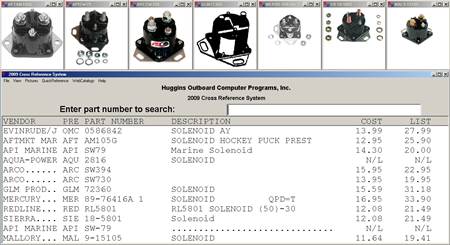
You can enter a factory
part number and the program will cross reference to all of the aftermarket parts
sources. You can enter an aftermarket part number and the program will
cross reference to the factory number and then back to all of the other
aftermarket sources. Over one million part numbers, descriptions, cost
prices, and list prices are included!!! Over 22,000 photographs are included for
the fast moving marine parts. All of the photographs in Mercury Marine’s
parts catalog are included. All of the pictures in Sierra’s catalog are
included. We have pictures from Aftermarket Marine, API, ARCO, SeaDoo,
CDI, GLM, Globe, Gasket Technology, Mallory, Mercury, Michigan, Outboard Recycle
Red Rhino Parts, OMC, Pro Marine, SEI, Sierra, Suzuki, Volvo, Yamaha,
etc.
This program has all of
the old superseded factory part numbers. When you enter an old superseded
part number, the program automatically supersedes it forward to each new part
number in the supersede chain.
This program is compatible
with Mercury Marine’s Electronic Parts Catalog (EPC) which allows users to
start with a horsepower or model number and then determine the proper factory
part number required to do the job. When used with Mercury’s EPC, a right
click of the mouse causes the XREF window to pop up and show the part number
and cost from all of the aftermarket parts sources.
The Huggins XREF program
is licensed per computer. Additional price options are available for
companies that need multiple computers running XREF. The program runs on
any IBM compatible computer running any version of Windows. A web version
is also available for an annual fee.
The Quick Reference allows
you to start with a brand, year, HP, and model number and see a list of common
replacement parts that fit this engine. Clicking on a part number will
show the references for that part.
This product will save you
time (sourcing alternate parts at wholesale) .
This product will save you
money (buy from the lowest cost source).
It will more than pay for
itself in just a short time. Buy it now!
Complete list of companies.
1.
ACD A.C. Delco
2.
ACM Arctic
Cat
3.
AEP Arrowhead
Electronics
4.
AFT Aftermarket
Marine
5.
AMD American
Marine
6.
ANC ANCOR
7.
API API
Marine
8.
AQU AquaPower
9.
ARC ARCO
10.
BAL Baldwin
11.
BAR Barr
Manifolds
12.
BOR Borg
Warner
13.
BOS BOSCH
14.
BRP SeaDoo, SkiDoo,
& ATV
15.
CAN Canada
Metals
16.
CAT
Caterpillar
17.
CDI CDI
18.
CER Cerlist
19.
CHA Champion Spark
Plugs
20.
CHI Chicago
Rawhide
21.
CHR Chrysler
Inboard
22.
CHS
ChrisCraft
23.
CLY Clymers
24.
CPI Champion
Parts
25.
CRU Crusader Engine
Parts
26.
CUM Cummins
Diesel
27.
DCO Delco
28.
DEL Delta
29.
DET Detroit
Diesel
30.
DEX Dexter
31.
DMI Dolphin
32.
DON Donovan
33.
ELE
Electrolux
34.
FAG FAG
Bearings
35.
FED Federal
Mogul
36.
FEL FELPRO
37.
FOR Ford
38.
FRA FRAM
39.
GEN Generac
40.
GLM GLM
Products
41.
GLO Globe RunDry
Impellers
42.
GMC General Motors
Corp
43.
GTI Gasket
Technology
44.
HIT Hitachi
45.
HOL Holly
46.
HON Honda
Marine
47.
IND Indmar
48.
JAB Jabsco
49.
JOH Johnson
Pump
50.
KAW Kawasaki
51.
KOH Kohler
Generators
52.
KON Konrad
53.
LIN LinkBelt
54.
LUB
LubriMatic
55.
MAL Mallory
Marine
56.
MAR March
Pumps
57.
MAS
MasterCraft
58.
MCC McCulloch
59.
MER Mercury &
MerCruiser
60.
MES MES Starters &
Alt.
61.
MIC Michigan
Wheel
62.
MLA Motorola
63.
MOR Morse
64.
MOT
MotorGuide
65.
MPR Marine
Power
66.
NAP NAPA
Parts
67.
NAU NauticPro
68.
NGK NGK Spark
Plugs
69.
NOK NOK seals
70.
NTN Bearings
71.
OBE
Oberdorfer
72.
OBR Outboard
Recycle
73.
OCC Outboard
Crankshaft
74.
OET Oetiker
75.
OMC
Evinrude/Johnson/OMC
76.
ONA Onan
Diesel
77.
OSC Osco
Manifolds
78.
PAR Parsun
79.
PCM Pleasure Craft
Marine
80.
PCO Propco
81.
PEN Penzoil
82.
PER Perkins
83.
POL Polaris
84.
PRE
Prestolite
85.
PRO Pro
Marine
86.
PRT
Pertronics
87.
RAC RACOR
88.
RAP Rapair
89.
RED RedLine
90.
ROC Rochester
91.
ROT Rotax
92.
SBT Short Block
Technologies
93.
SCP SCP
94.
SEA SeaWay
95.
SEI Sterndrive
Eng
96.
SHE Sherwood
Pumps
97.
SIE Sierra
98.
SMI Southeast
Marine
99.
SOL Solas
Propeller
100.
STI Stiletto
101.
SUZ Suzuki
102.
SYS
SysteMatched
103.
TEC Tech2o
104.
TEL Teleflex
105.
TEM Tempo
106.
TIM Timken
107.
TOH
Nissan/Tohatsu
108.
TOR
Torrington
109.
TRA Transcom
Seals
110.
TYP Typhoon
111.
UFL UflexUSA
112.
UNI Universal
113.
VAL Valeo
114.
VER Vertex
115.
VES Vesrah
116.
VOL Volvo
117.
WES
Westerbeke
118.
WIR Wiretec
119.
WIS Wiseco
120.
WIX WIX
Filters
121.
WSM WSM
Marine
122.
YAM Yamaha
123.
YAN YANMAR
124.
ZEN
Zenith
2014 Huggins Cross Reference System
Installation:
This program works with Windows98, ME, NT, 2000,
Windows XP, Windows Vista, Windows 7 & Windows 8. 64 & 32
bit.
1.
Place the Huggins Cross Reference
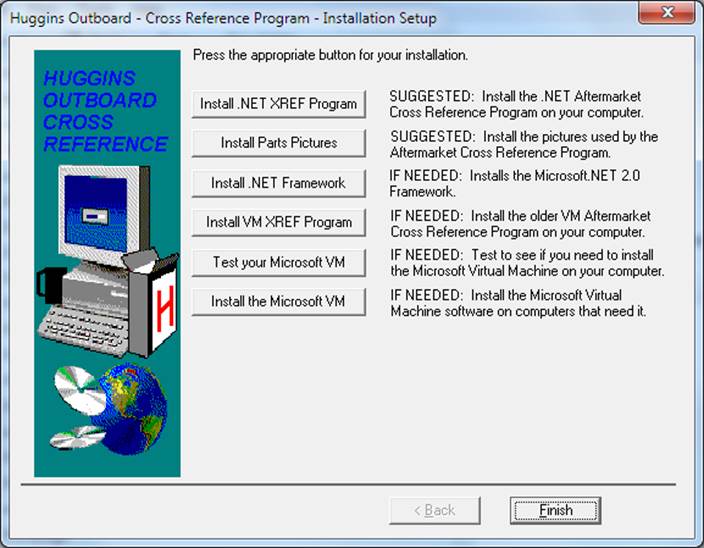
Program CD into the CD-ROM drive. When you insert your CD, the Huggins
Installation Setup Screen starts automatically.
2.
If the Installation Setup screen
does not start automatically, click the Start button on the Windows tool
bar. Select “Run” and then type D:\SETUP in the white open slot and press
< ENTER> or click the “OK” button. If there is already text in the
“Open” slot, delete it and then type D:\SETUP.
Note: If your CD-ROM drive is not designated as D:,
then substitute your designated drive letter for D:
3.
Choose the Install .NET XREF
Program button to begin installation. The install will start in a few
seconds.
4.
Click “Next” to continue the
installation past the welcome screen.
5.
Please read the license
agreement. If you accept all the terms of the agreement, click the “I
accept the agreement” radio button and then click the “Next” button to continue
installation.
6.
The program will be installed in
your c:\huggins folder.
Please
click “Next” to continue the installation of the program.
7.
Click “Install” to install the
program. This process will take 20 – 40 seconds, depending on the speed
of your computer.
8.
Click “Finish” on the exit screen
and you should be returned to the button screen shown above.
9.
To install the pictures, click
“Install Parts Pictures” and follow the on screen instructions.
The remaining buttons
should not be needed for most installs. Only use the bottom 4 buttons if
instructed:
Very few users will need
to install the .NET Framework. Only older computers will need this.
For example, Windows XP computers might need this download if it has never been
done before. Windows Vista, Windows 7, and Windows 8, and Windows
8.1 computers should not need this button.
Between 2000 and 2010,
Huggins shipped the XREF program only as a Java program that needed the
Microsoft Virtual Machine. Huggins is still shipping this older
technology version of the cross reference for users that want to continue using
this older version. To install the current version of this Java based
program, press the button marked “Install VM XREF Program.” We only suggest you
install the VM XREF program if you have an older operating system or if you know
that you have run the older Java program on your computer already.
If you want to know if
your older computer is already capable of running the older Microsoft VM version
of the XREF, you can click the “Test your Microsoft VM” button. You will
get a message the your VM is good enough or you will get an error message that
reads something like “Unable to start the application. Class not
registered.” If you get the error and you want to run the older Microsoft
VM version of the XREF, then you will need to install the Microsoft VM using the
bottom button.
Troubleshooting:
- If you cannot start the
installation or read the CD, try turning your computer off to reset all of your
hardware.
- If you have a very old
Windows XP computer, you might need to install the .NET Framework. Later
versions of XP and all later operating systems came with the .NET Framework
already installed.
- If you get the
error “The application failed to initialize properly (0xc0000135)”, you
are running the .NET XREF program and you need to install the .NET
Framework.
- If you get the error
“Class not registered”, you are running the VM XREF program and you need to
install the Microsoft Virtual Machine. Press the bottom button to install
the Microsoft Virtual Machine.
Operation:
Type any part number. The program will determine
whose part number it is and search for all cross references. In case of
duplicate part numbers from multiple companies, you may prefix any part number
with the company abbreviation (Example: AQU2882,
also try OMC, MER, YAM, VOL, SIE, GLM,
AQU, MIC, SUZ, WIS, ARC, CDI, RAP, MAL, etc). Mercury part numbers can be
typed with or without the prefix (Example: 47-89982 or
89982; MER47-89982 or MER89982). Mercury suffixes are important (46-77177A 1 is different from 46-77177A
3). Yamaha part numbers can be
entered with or without dashes. 93210-50MA8-00 is the same as
9321050MA800. On Yamaha parts that end with –00, you do not have to type
it. There are several levels of parts searching. Once you run the
program, click “View” & “XREF Level”. We suggest you try Level 2 to
get an “apples to apples” XREF search.
Please
call (919) 787-1836 and tell us how you like this program!
E-mail: support@hugginsweb.com
Huggins Outboard
- 7524 S. Tanglewild Drive - Raleigh, NC 27613 - (919) 787-1836 - (919) 787-1890
fax /
http://www.hug911.com/
robert@hugginsweb.com
How does the Huggins
Outboard Aftermarket Cross Reference (XREF)
work with Mercury Marine’s
Electronic Parts Catalog
(EPC)?
$167.00
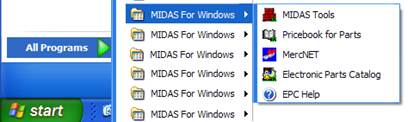
Mercury’s Electronic Parts Catalog (EPC) is the way Mercury
dealers lookup part numbers when repairing Mercury products. Once
installed on your computer, EPC is selected from the windows start menu or an
icon on your desktop.

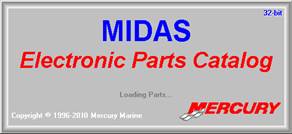
Next you see the
intro screen flash
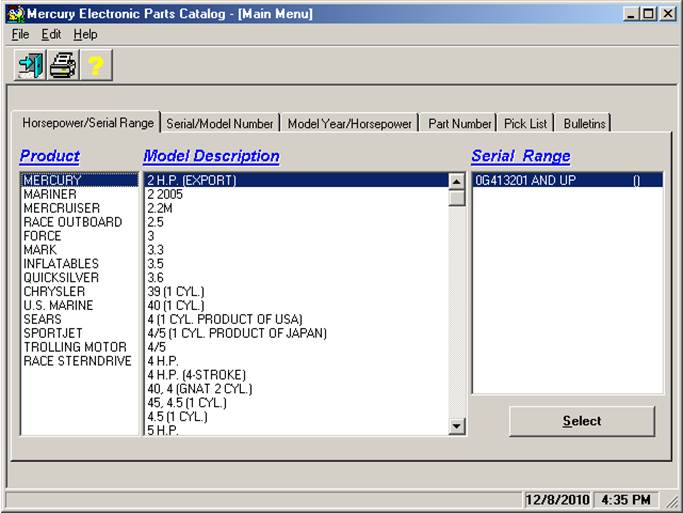
Then you will
see the Main Menu…
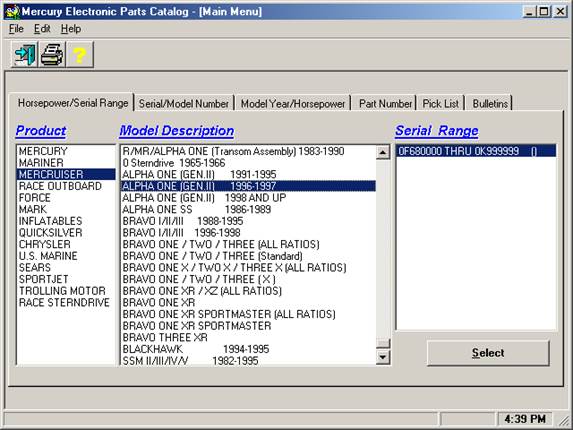
Let’s select
something real, like a Gimbal Bearing on a 1997 Alpha One Outdrive…
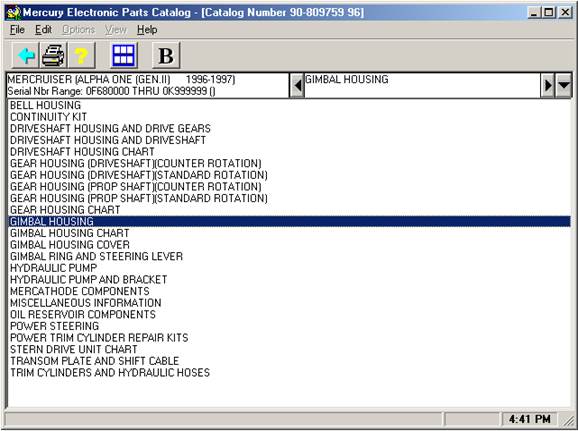
Once we select
MERCRUISER and the outdrive, we must select the sub-assembly “GIMBAL
HOUSING”…
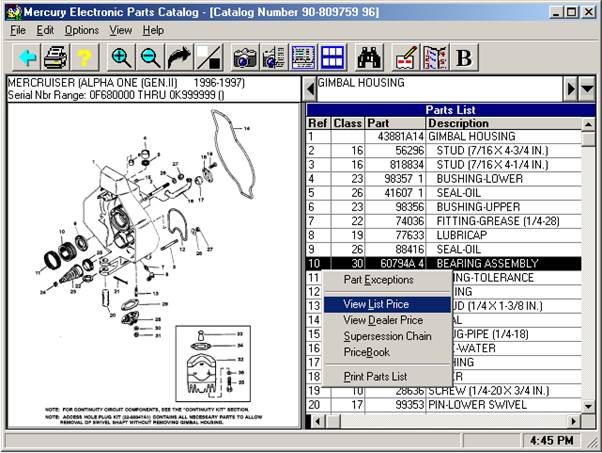
Now we see the
fiche image of the gimbal housing and we can select #10, the Gimbal Bearing
Assembly…
If we right
click on the black line that we selected for the gimbal bearing, we can select
View List Price…
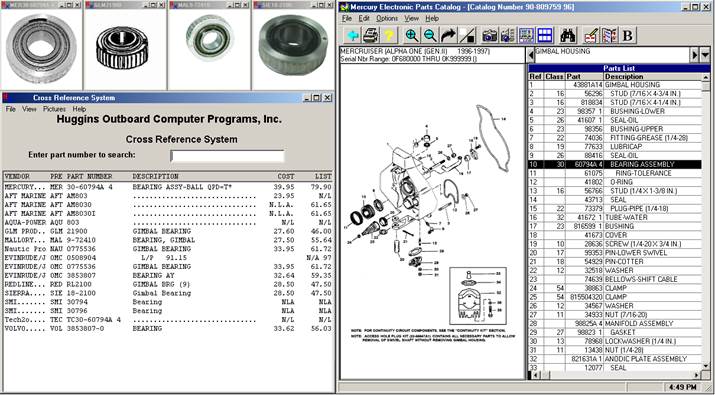
The Huggins
XREF program will pop-up along side of the EPC with the part cross referenced to
it’s sources.
Please call us
if you have any questions about XREF or EPC integration. Huggins
Outboard (919) 787-1836